dns On‑premises cloud Private cloud
Enable Agentic AI at scale
AI agents are beginning to operate engineering software autonomously. Engineering teams that put AI agents to work on simulation tasks complete more design iterations, evaluate more candidates, and reach better decisions faster - without adding headcount.
The question is not whether this will affect simulation-driven engineering - it is whether your tools are ready to be called by an agent. pSeven Enterprise is built to make that possible. Your simulation expertise, captured in workflows and apps, becomes directly accessible to AI agents.

What AI agents can do
in  pSeven Enterprise
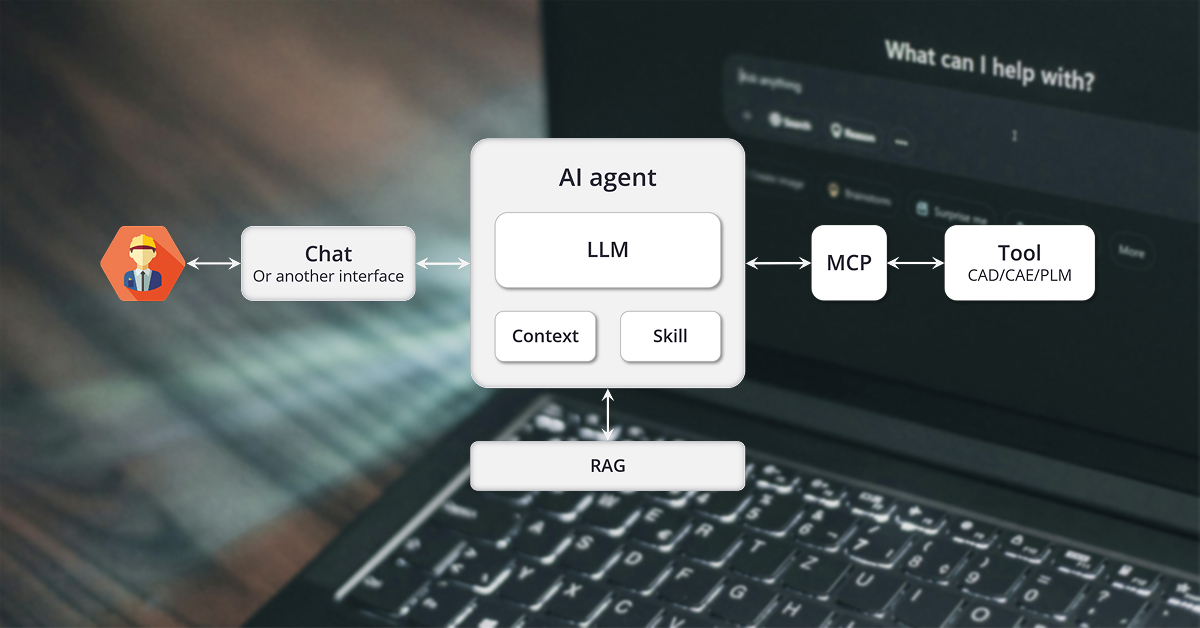
Agentic AI in pSeven Enterprise sits at the point where engineering expertise meets formalization - helping capture simulation processes into workflows, and then exposing them through apps to users and AI agents. Rather than requiring teams to rebuild that expertise in a new form for AI consumption, pSeven Enterprise exposes it through MCP, a standardized protocol that any compatible AI agent can connect to. The result is a direct bridge between the agent and your simulation environment.

Provide deterministic tools to non-deterministic AI agents
Give agents a set of validated simulation tools to call in a controlled environment, so the important parts of the workflow stay deterministic, while agents focus on orchestration and decision-making.

Make simulation accessible to more employees
Engineers outside the simulation team can run validated analyses by describing what they need in natural language, and the agent handles the rest using validated workflows and apps.

Build automation resilient to variability
Embedding AI inside workflows allows the automation to handle mismatch in units, navigate variability, generate reports, and keep the process moving where a hard-coded script would stop.
New to AI in engineering automation?
Our article "ABCs of AI in engineering automation" covers the key concepts, limitations, and prospects - written for those just getting started.
Only 17% of organizations have deployed AI agents to date, yet more than 60% expect to do so within the next two years - the most aggressive adoption curve among all emerging technologies.
- according to research carried out by Gartner in 2026
Learn more navigate_next
Execute and combine simulation apps
via chat interface in natural language
Connect AI agents to your published apps on AppsHub. The agent can browse the available apps, inspect the inputs and outputs, run them with values determined by the agent or received from a previous step, and pass the results forward into the next stage of the pipeline - all driven by natural language instructions from the engineer. Tasks that previously involved manually navigating the interface, configuring inputs, waiting for results and entering them into the next tool can now be delegated to an agent with a single prompt. The engineer stays in control over what is approved and acted upon, while the agent handles the execution mechanics.

Publication of workflows into AppsHub as simulation apps and calling them via a chat interface.
Build and execute workflows
autonomously in agentic cycles*
An agent connected to Studio can assemble workflows, configure blocks, execute runs, and publish the result as an AppsHub app - actively building and refining the process in response to intermediate results rather than simply executing a predefined one. The ability to combine apps through a chat interface provides engineers with a path from open-ended agentic exploration to a fully deterministic, repeatable workflow that runs reliably without agent involvement every time.

Running a sequence of simulation apps, assembling a deterministic workflow and publishing it back into AppsHub.
* - Available on request
Introduce process tolerance in workflows
with non-rigid automation*
Real engineering workflows encounter variability that rigid automation cannot handle, such as output variability, unit mismatch, or intermediate results that require interpretation before the next step can proceed, for example, in Request-for-Quote tasks. Agentic-ready blocks embed AI reasoning directly at these points, resolving issues without stopping execution and generating custom reports as a natural part of the workflow rather than a manual step added at the end. Each block can be configured as a focused autonomous agent with a specific role, like a units converter, a results interpreter, a report writer etc.

A workflow featuring a specialized AI block for generating reports.

A workflow featuring a specialized AI block for checking mesh convergence.
* - Available on request
Accelerate adoption of agentic AI
with a variety of agentic-ready blocks
Whether you are starting with AppsHub execution, adding agentic-ready blocks to existing workflows, or exploring Studio-level automation, our Marketplace provides ready-to-use building blocks for each layer. The Agent block, the Agentic App Reference, and the Agentic DSE block are available now and cover the most common entry points for teams getting started.

Agent
LLM agent that calls other workflow blocks as tools. Give it a task on User prompt; it plans, calls the tools you wired, and answers on Response.

Agentic App Reference
References a published AppsHub app and runs it as a block - the agentic analog of the built-in App reference block.

Interested in agentic AI for your engineering workflows?
We are actively developing this capability and working with early adopters. If you want to explore what agentic automation could look like in your simulation environment, let's start the conversation.
Frequently asked questions
AI technology has crossed a threshold in engineering. LLMs can now reason reliably enough across multi-step technical tasks that agents are moving from research environments into production workflows at early-adopter organizations. The teams building the interfaces between their simulation environments and AI agents today are establishing a capability advantage that will be difficult to close in two or three years. The cost of waiting is not staying still - it is falling behind organizations that are not waiting.
A working prototype that connects an LLM to a simulation tool through a chat interface can be assembled in days. The challenge is everything that follows: concurrent users, access rights control, run state management, failure recovery, auditability, etc. Vibe-coded solutions are fast to start and expensive to maintain - the ongoing cost of maintaining a custom integration typically far exceeds the cost of building it, plus it pulls engineering talent away from the work it was hired to do.
pSeven Enterprise provides that infrastructure as a maintained, versioned platform. Your team's effort goes into the workflows, apps, and agent configurations specific to your engineering processes - where your competitive differentiation actually lives.
Any LLM that powers an MCP-compatible desktop AI client can be used with pSeven Enterprise. The MCP protocol is model-agnostic - pSeven Enterprise does not communicate with the LLM directly, only with the client application that wraps it. This gives your organization the flexibility to use the AI provider that meets your performance, cost, data residency, and compliance requirements, and to switch providers without any changes on the pSeven Enterprise side.
We actively use the following models or better in our tests and can recommend them:
- GPT‑5.3, Sonnet 4.6, Opus 4.8, GLM‑5V‑Turbo, Kimi K2.6, DeepSeek‑V4, Qwen3.6‑Plus or better.
Yes - and this is one of the core design principles behind pSeven Enterprise. The platform has always been built around connecting simulation environments rather than replacing them, so existing tool integration is the starting point rather than an afterthought.
At the execution level, the platform's built-in resource manager handles concurrent simulation runs across your server infrastructure, so adding more agents driving more workflows does not require a separate scaling strategy - it uses the same execution capacity you already manage.
The MCP server exposes your app and workflow interfaces to the AI agent - inputs, outputs, and run status. What data is transmitted to the AI provider depends on what the agent sends as part of its reasoning process, which is determined by your AI client configuration and the AI provider's data handling policy. pSeven Enterprise itself does not send simulation data to any external AI service. We recommend reviewing your AI provider's data residency and privacy terms for enterprise deployments.
We are making capabilities marked with "Available on request" available to selected early adopters. Participants will be in direct contact with the product team to better shape the future of this functionality. If your organization is evaluating AI in engineering automation, this is the right moment to be involved.