Automation of the rolling process using QForm and pSeven Desktop
Industry: Industrial equipment | Product:  pSeven Desktop
Introduction
Within the framework of the Industry 4.0 concept, engineering and design work increasingly relies on digital technologies aimed at improving flexibility, efficiency, and the quality of design and production. Modern products and technological processes are characterized by high complexity and multi-factor dependencies, which require engineers to conduct a large number of numerical experiments using CAE systems. Such simulations make it possible to evaluate strength, durability, thermal and dynamic characteristics of products, as well as to analyze the influence of process parameters on the quality of the final product. However, an increase in the number of simulation scenarios and parameters leads to significant time costs for preparation, execution, and analysis of results, especially when using traditional, predominantly manual approaches.
Problem statement
In the context of industrial digital transformation, the need for automation of engineering studies and optimization tasks becomes obvious. The transition from single simulations to systematic parametric studies and multi-objective optimization requires specialized tools capable of effectively managing computational workflows and processing large volumes of data.
Solution
One such solution is the software package pSeven Desktop, which significantly reduces the share of manual labor in CAE studies. By automating parameter variation, simulation execution, and result analysis, pSeven Desktop increases engineering productivity and expands the possibilities for finding optimal design solutions.
In addition to optimizing product design parameters, pSeven Desktop can be used to automate the design and optimization of manufacturing processes. It is effectively applied in modeling and optimizing technologies such as casting, metal forming, welding, heat treatment, and composite manufacturing, where it is necessary to account for a large number of interrelated parameters and process conditions. This makes pSeven Desktop a universal digital engineering tool that improves the quality and efficiency of product and process development.
To conduct parametric studies or automatic optimization using various CAE systems in pSeven Desktop, it is necessary to build a workflow consisting of functional blocks and the connections between them (Fig. 1). Each block performs specific actions with external software and internal procedures, while the connections transfer data between blocks and define the execution order. pSeven Desktop includes an extensive library of direct integration blocks for various commercial CAD and CAE systems, simplifying workflow building for users. Currently, users have access to integration blocks for:
- SolidWorks, Creo, NX, CATIA, SolidEdge;
- Ansys, Abaqus, Amesim, ANSA, FloEFD, Forge, Simcenter 3D, SimulationX, Star-CCM+;
- FMI models, Excel.
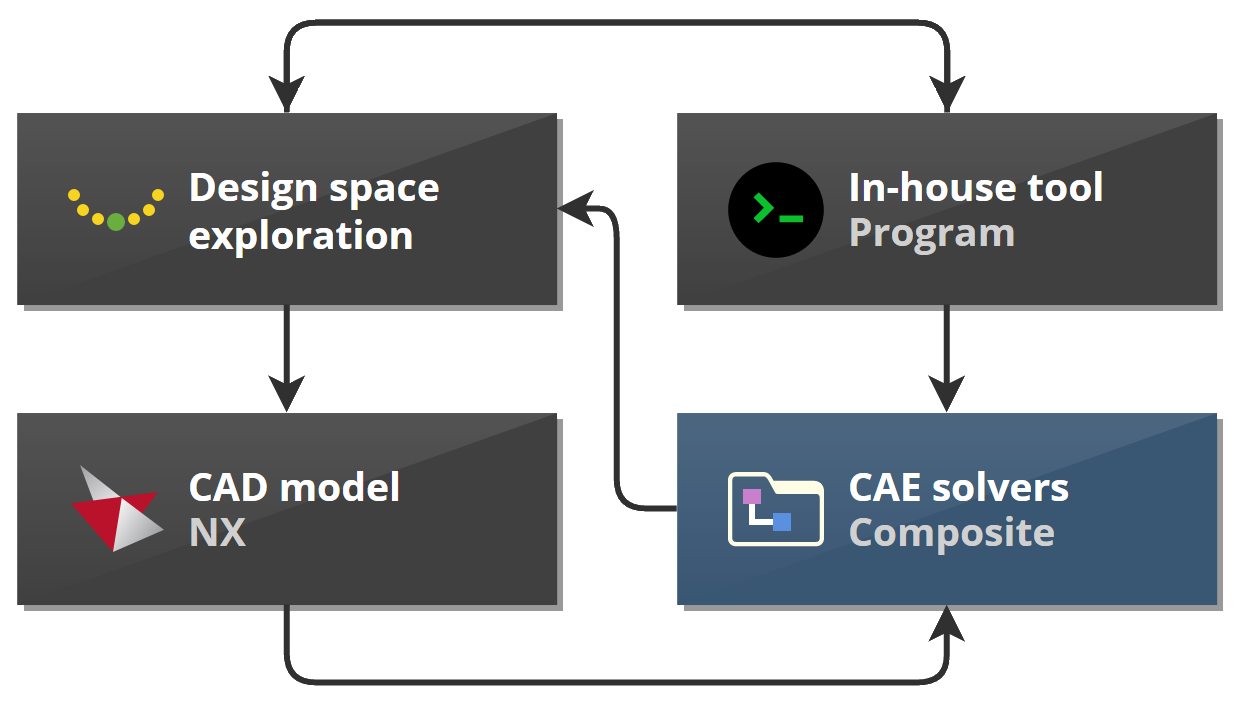
Fig. 1. Example of a workflow for design optimization.
It is also possible to integrate virtually any other software or in-house tools using a generic approach via input/output file exchange and command-line execution, which is available by default in most CAD/CAE packages. In addition, users can develop their own direct integration blocks using APIs.
The wide integration capabilities of different software and the flexibility of building workflows in pSeven Desktop, as well as built-in advanced algorithms for design of experiments, optimization, and predictive modeling allow solving engineering problems of any complexity level - from simple integration of third-party software into a single workflow to multi-level multidisciplinary optimization tasks, including cyclic, branched, and nested computational schemes.
To accelerate complex multi-variant simulations, pSeven Desktop provides the ability to run workflows on remote Windows machines (using a separate pSeven Agent module), on Linux via SSH, or on clusters using direct interfaces to job schedulers such as Slurm, LSF, and Torque.
As an example of using pSeven Desktop in manufacturing simulations, let's consider the integration with QForm - a specialized software for simulating metal forming processes. It allows simulation of closed and open die forging; cold forming; various rolling processes; sheet metal forming; ring rolling; extrusion; heat treatment; and microstructure evolution.
QForm is widely used in manufacturing industry to reduce costs by decreasing the number of experiments and trial runs; to design new production technologies - selecting billet and tool materials, choosing equipment, calculating loads, number of operations, heating and cooling regimes; and to improve product quality by identifying and eliminating defects and analyzing and improving tool life.
One of our customers needed an approach that would automatically determine the optimal geometry of the rolls in the longitudinal rolling process of an aluminium billet. Fig. 2 shows a general view of such a process. During the rolling process, the billet - heated to a temperature of 560°C - undergoes changes in shape and cross-sectional dimensions as it is compressed by the rolls in each rolling mill stand.
When developing such a process, the process engineer faces the task of designing the geometry of the working surfaces of the preliminary rolls and the distance between the rolls (the roll gap) to ensure a specific ratio of billet reduction (the difference between the cross-sectional area of the billet before entering the mill stand and after exiting). A low ratio of reduction indicates an inefficient process, while too high a ratio leads to the formation of surface defects in the billet and increased tool wear.

Fig. 2. Simulation results of aluminum billet rolling in QForm for a 14-stand rolling mill.
The design of roll geometry for each mill stand was carried out in QForm as follows. At the first stage, the user created the geometry of rolls for all mill stands (their number somitimes can reach 18) and performed a simulation of the rolling process, evaluating the reduction ratio in each mill stand. In zones where the reduction ratio did not fall within the desired range, adjustments were made to the roll geometry and a new simulation was performed.
However, the complexity of the design lies in the direct dependency of each mill stand group on the others: changing the roll gap in one stand, and consequently the billet cross-section, requires adjustments in all subsequent stands. Therefore, the engineer must perform many iterations to select the required tool geometry. At the same time, a single simulation takes on average 1–2 days, and the design process may take from several weeks to a month. In this regard, the customer decided to automate this process using pSeven Desktop.
Straightforward integration of QForm into a pSeven Desktop workflow using standard tools is not available due to the absence of textual input and output files for this particular task. However, it is possible to use scripts based on QForm API for communication and control of the simulation. A Python script can be written using QForm built-in tool and then integrated into pSeven Desktop workflow via a PythonScript block for execution during optimization.
In general, it is possible to configure a workflow to optimize all tools of all mill stands simultaneously, similar to how a user would do it manually in QForm. However, such a formulation would require varying a large number of variables and simulation cases; given the complexity and long runtime, the optimization process could take a significant amount of time. Performance can be improved by running workflows in parallel using multiple HPC servers, provided sufficient software licenses are available.
Nevertheless, for this task, an approach of sequential optimization of each individual stand was chosen. This was made possible by the flexibility of workflow building in pSeven Desktop and the ability to model interconnected operations in QForm.
The implemented workflow is shown in Fig. 3. Optimization is first performed for the first mill stand, where the billet movement through the rolls is simulated to evaluate the resulting reduction ratio. Since the billet travel path is short, the optimal solution is found relatively quickly. The simulation continues until the reduction ratio falls within the specified range.
After finding the optimal solution for the first mill stand, the next simulation is performed: a new operation is created in the task, where the billet movement up to the next stand is simulated, saving computational time for the next stage. Then the roll geometry of the second mill stand is optimized, and so on. After completing the entire workflow, the user obtains a ready solution for the geometry of each mill stand’s tools that meets technological requirements. Thanks to sequential optimization and automated workflow execution in pSeven Desktop, the design time of the technological process was reduced by up to three times.

Fig.3. Example of a workflow for sequential optimization of roll geometry for the first three rolling mill stands.
Conclusion
In conclusion, it can be noted that the integration of QForm and pSeven Desktop makes it possible to effectively automate labor-intensive processes of designing and optimizing longitudinal rolling processes, and can also be applied to other technologies, such as cross-roll piercing, sheet and bulk forming, ring rolling, forging, and others.